Everything You Need to Build a Useful Org Chart
Create the structure, assign people, import spreadsheet data, and share the result without rebuilding charts in slides.
Edit Org Charts Visually
Add top positions, create child and sibling positions, build teams, drag reporting lines, and zoom around the canvas as the structure grows.
Quick add controls
Add root, child, and sibling positions from the chart.
Drag-and-drop structure
Reorder positions, reparent reporting lines, and duplicate branches.
Pan, zoom, and focus
Navigate large charts and open focused sub-chart views.

Keep Positions and People Clear
Each position can carry the context people need: title, assigned person, department, description, color, and card display settings.
People assignments
Add profile photos, LinkedIn links, and assign or unassign people from positions.
Position details
Edit descriptions, departments, card colors, and horizontal or vertical subordinate layouts.

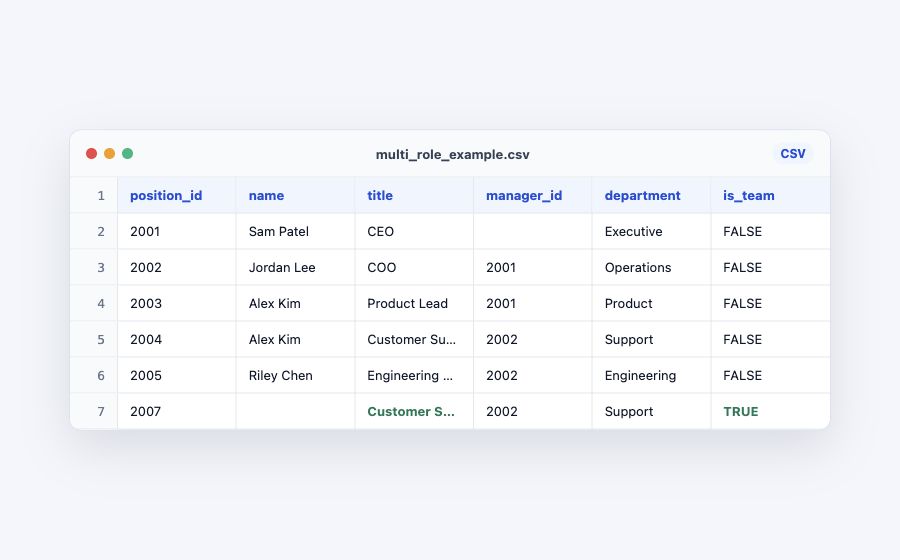
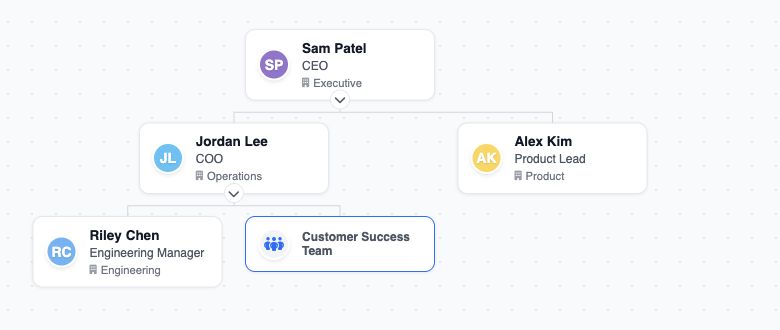
Turn Spreadsheets Into Org Charts
Bring in CSV or XLSX files, validate the structure, then clean up the generated chart visually.
Publish Clean Outputs
Share read-only links, embed charts in other pages, or export files for decks, docs, and spreadsheet workflows.
Public links
Send a read-only chart link when people only need the latest view.
Embeds
Place a chart in a page with an iframe embed.
Exports
Export PNG, PDF, and CSV files with TeamChart Pro.

Use TeamChart as a Workspace
Start from templates, manage multiple org charts, and keep a clean workspace for planning or client work.
View example org charts See the org chart makerTemplates
Start with common org structures instead of a blank canvas.
Chart management
Create, duplicate, delete, and track updates across org charts.
Display controls
Show or hide departments, descriptions, LinkedIn links, logos, and themes.
Scenario-friendly copies
Duplicate charts when you need a separate planning version.
Build Your First Org Chart in TeamChart
Try one org chart for free. Upgrade when you need larger charts, imports, exports, or themes.